$ kubectl get pods -n broken
$ kubectl describe pod crashloop-69b8448c78-g9sst
$ kubectl get events -n broken --sort-by=.lastTimestamp
$ kubectl logs crashloop-69b8448c78-g9sst --previous
$ kubectl get cm app-config -o yaml
Five commands, four scrollbacks, and you still have to hold the correlation in your head.
Problems · the diagnosis engine
It tells you what is wrong, not just that something is.
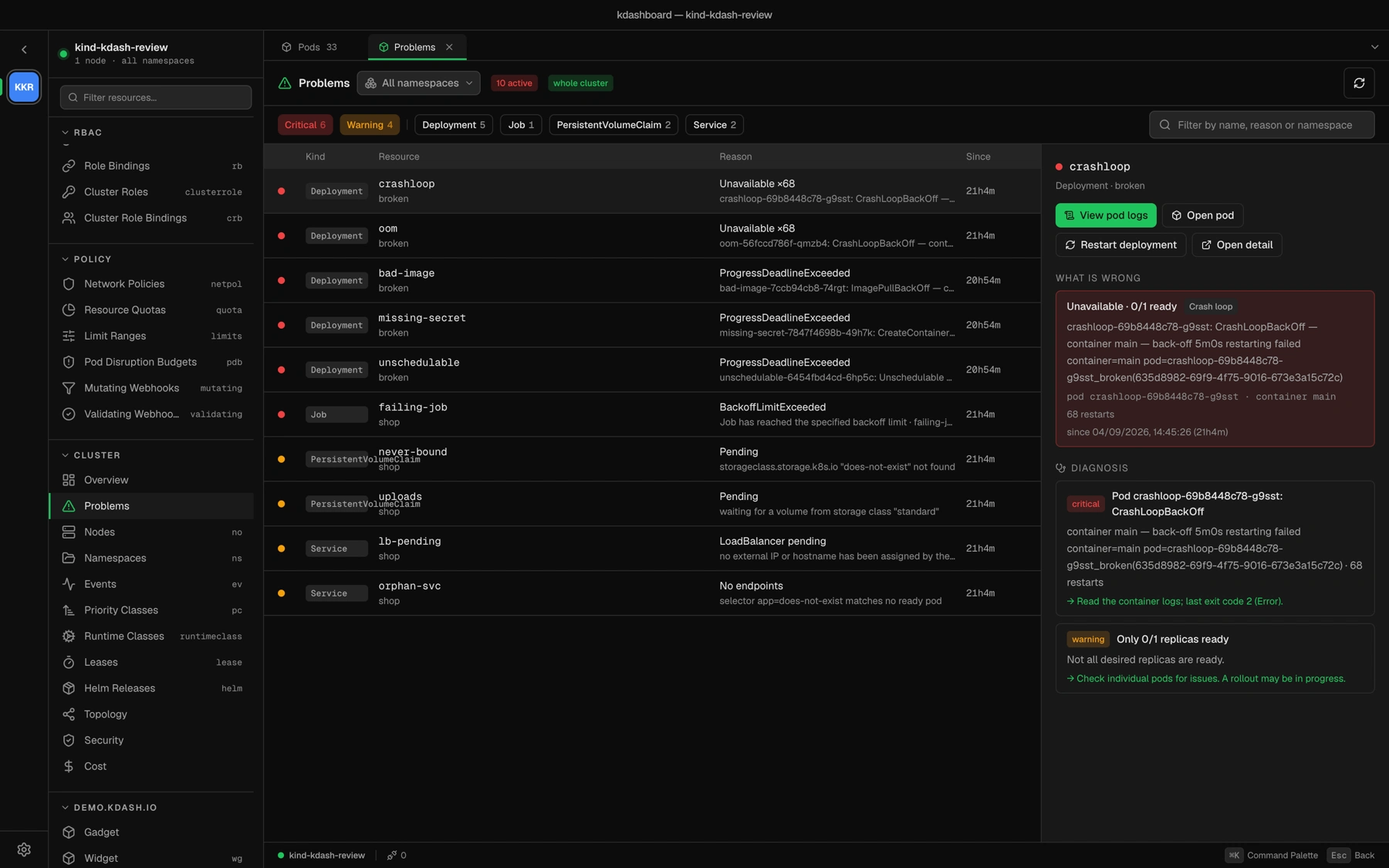
Kubernetes already knows why your pod is unhappy. It just spreads the answer across a status, a condition, an event and a container state. Problems correlates the four into one card with a cause and a next step.
What a card carries
1 Identity. Severity, kind, name, namespace and owner — and the pod that actually failed when it is not the object you clicked.
2 What is wrong. The reason as Kubernetes reports it, the restart count, the timestamp it started, and a cause from a closed vocabulary.
3 Diagnosis. One or more findings from the backend checks, each with a title, a detail and an accent next step prefixed by an arrow.
4 Only the buttons that help. A crash loop offers logs and a restart. A pending volume offers the YAML. An image pull offers neither.
The cause vocabulary · ten values, never free text
Image cannot be pulledConfiguration errorCrash loopOut of memoryUnschedulableRollout stuckJob failedVolume not provisionedNo endpointsLoadBalancer pending
On the wire image-pull · config · crash · oom unschedulable · progress-deadline job-failed · pvc-pending · no-endpoints lb-pending · unknownA closed vocabulary is what lets the card decide which actions to offer, and what the AI agent reads when you ask it to investigate.
Without it
With it
Unavailable · 0/1 ready Crash loop container main — back-off 5m0s restarting failed · 68 restarts · last exit code 2 (Error) → Read the container logs; the last exit code is 2 (Error).
View pod logs Restart deployment Investigate with agent
One card, in the window you were already in. Kinds scanned 8 nodes, deployments, statefulsets, daemonsets, jobs, pods, claims, services
Scope cluster or one namespace, from the same picker
Also surfaced in 3 places Overview · the alerts popover · the agent